FNB Voucher 🇿🇦
FNB Voucher is a prepaid voucher from First National Bank (South Africa). Like 1Voucher, it turns cash into a PIN your customers can use to pay for internet access through Powerlynx.
Configuration
You need a Flash merchant account with the Exclusive Voucher product enabled. If you don't have one, contact Flash to request it.
Which Flash platform?
Flash runs two platforms, and Powerlynx supports both:
- Keycloak + Glu Control — the current platform. All new merchants are onboarded to it, and Flash issues you a client ID and client secret together with an API key.
- FlashSwitch (legacy) — the older platform. Existing merchants can keep using it, but Flash will switch it off. When that happens, FNB Voucher payments stop until you change your configuration to Keycloak + Glu Control with the new credentials from Flash.
If you're not sure which platform your credentials belong to, ask Flash before you start.
Credentials
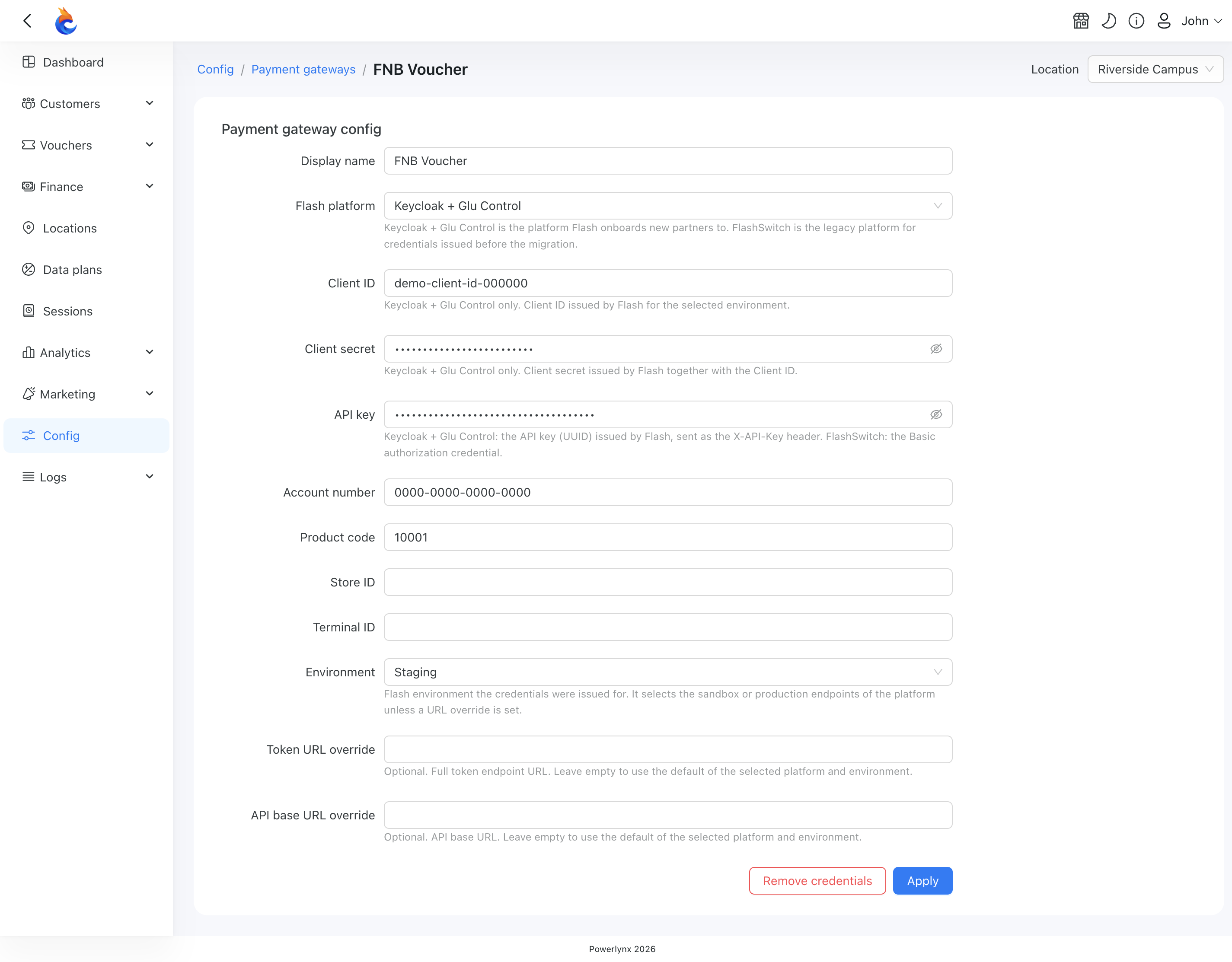
To connect FNB Voucher to Powerlynx, enter these credentials:
| Attribute | Required | Data type | Description |
|---|---|---|---|
| Flash platform | YES | Select | Keycloak + Glu Control or FlashSwitch (legacy) — the platform your credentials were issued for |
| Client ID | Keycloak + Glu Control only | String | The client ID Flash issued for the selected environment. Not used on FlashSwitch |
| Client secret | Keycloak + Glu Control only | String | The client secret Flash issued together with the client ID. Not used on FlashSwitch |
| API key | YES | String | The API key Flash issued for your account. On Keycloak + Glu Control it is a separate key issued alongside the client ID and secret |
| Account number | YES | String | The merchant account number, exactly as issued (with dashes) |
| Product code | YES | Number | The Exclusive Voucher product code from Flash |
| Store ID | NO | String | The store where the voucher was purchased. Leave it empty if you're not sure |
| Terminal ID | NO | String | The till within the store. Leave it empty if you're not sure |
| Environment | YES | Select | Use Production for a live account, or Staging for testing. Flash issues separate credentials for each environment — enter the ones issued for the environment you select |
| Token URL override | NO | String | Leave empty unless Flash gave you a different token address |
| API base URL override | NO | String | Leave empty unless Flash gave you a different API address |
In your Powerlynx account, go to Config → Finance → Payment Gateways → FNB Voucher and fill in the fields.
INFO
A new configuration has no platform selected, and you can't save it until you choose one. A configuration you saved before keeps working on FlashSwitch (legacy), and opens with that platform selected.
WARNING
The two override fields only accept an https:// address on a Flash domain (flash.co.za, flash-group.com, or a subdomain of either). Leave them empty unless Flash asks you to use a specific address.
As with the other payment gateways, use the Location filter to make this account the default for the whole system, or link it to a specific location — so different locations can use different merchant accounts.
Enable it for a location
Enable FNB Voucher for the locations that should offer it: go to Locations, open a location, switch to the Payment Gateways tab, and turn on FNB Voucher. If it's disabled, customers at that location won't see it as a payment option.
Paying with FNB Voucher
On the splash page, after choosing a data plan, the customer enters their voucher PIN to pay. Powerlynx contacts Flash to validate the PIN and, once it's confirmed, grants access.
If the PIN is rejected, the customer sees the reason Flash gives — for example, "The voucher you have entered could not be found." If the connection to Flash drops before Powerlynx gets an answer, Powerlynx reverses the payment, so the customer is not charged for access they didn't get.
TIP
If your customers see "Payment is temporarily unavailable. Please try again later or contact support.", Flash has refused your gateway settings rather than the voucher, and the voucher was not charged. Check the Flash platform, credentials, environment and any override addresses in the FNB Voucher configuration.
You can track these payments under Finance → Payments.